
3.6 Searching in Google Scholar
Google Scholar is another option for searching for articles. It does not use the same boolean-style search as the Library Search or other databases available through the library, so we have to use a simple keyword search.
Disclaimer
Building a Search in Google Scholar
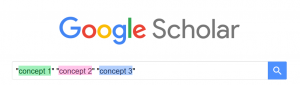
Google Scholar does not use the same boolean terms or search tools that other databases use. In Google Scholar, we want to search one keyword for each concept:
~~~
Steps to a Search
1. Pick one keyword for each concept and try putting that in your search

2. Examine your results then try out different keyword combinations


3. Stop you have found enough results you like and use the “GetIt @ UAlberta” link to get full-text from the UAlberta Library

Search Tips:
- If you have too few results, try using fewer keywords
- If you have irrelevant results, try using more specific keywords
- Simple searches often work best
- Searching is iterative, keep trying new searches until you have enough useful results
Note:
Use the Google Scholar link on the library homepage when working off-campus. This ensures you can access articles with the “GetIt @ UAlberta” link

https://library.ualberta.ca/google-scholar