
Library Resources
Searching for Journal Articles on a Topic
Before You Start Searching
Know your topic
You may need to think of a research topic that interests you, or a topic might be assigned to you. If you are assigned a specific topic, make sure you understand it by doing some background reading before starting to search for more detailed information. For more guidance, watch this 2-minute video on choosing a research topic.
Identify key terms
Take a few minutes to identify particular key terms, synonyms, and related terms that could help you find the most relevant information on your topic. You might find it useful to create a table that includes each key concept, along with any other words and phrases you could use. For example, if I were researching the effects of forest fires on native plant species in Canada, I could use these concepts and terms:
| Concepts | Key Terms |
| 1. Forest fires | forest fires, wildfires, fire ecology |
| 2. Native plant species | native plant species, endemic plants |
| 3. Canada | Canada, Alberta, boreal forest |
This 2-minute video on key concepts and keywords gives more suggestions for how to identify them.
Where to Search
Search the Library
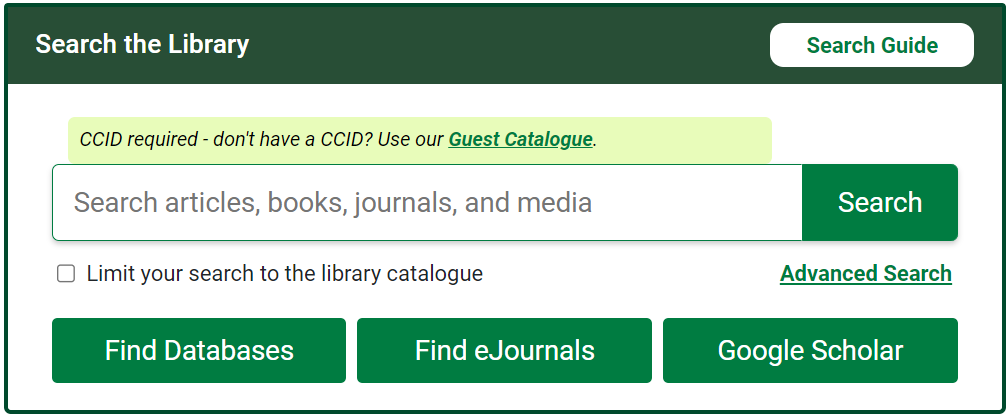
The Search the Library box on the library website can be a good starting point. In addition to the library catalogue, it also searches about 250 of the library’s 1500+ databases. If you enter your key concepts into the search box, you might find books, journal articles, magazine and news articles, and other types of information sources on your topic. It includes resources in many different disciplines, so some of the results may not be specific to biology.
Subject-specific databases
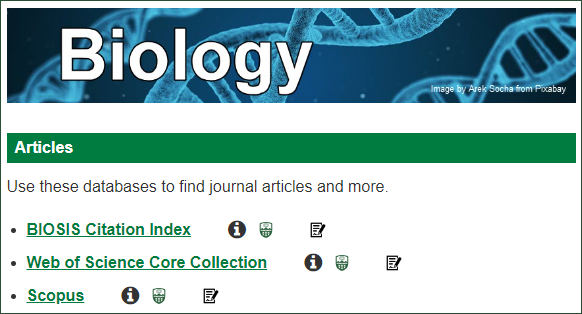
For a more focused search, try Augustana Library’s Biology Subject Guide. It includes links to biology and science databases like BIOSIS Citation Index, Web of Science Core Collection, and Scopus. Try searching for your key terms in any of these three databases to find relevant information. They include mostly journal articles, along with some other types of sources, like conference papers, book chapters, and editorials.
How to Search
Combining terms
When you search for information in library databases, you often need to use search operators to put your key terms together. The following examples show how to do this using the topic of drug-resistant tuberculosis.
| Search operator | What it does | Example |
| AND | Narrows your search (fewer results) | tuberculosis AND antibiotics |
| OR | Broadens your search (more results) | antibiotics OR streptomycin |
| (parentheses) | Lets you combine multiple concepts and synonyms for a more complex search | (antibiotics OR streptomycin) AND tuberculosis |
| Quotation marks | Searches for an exact phrase | “mycobacterium tuberculosis” |
| truncation symbol (* in most library databases) | Makes search terms open-ended | resistan* (this will find both resistance and resistant) |
Here is an example search phrase that uses all of the strategies outlined above:
(antibiotics OR streptomycin) AND resistan* AND “mycobacterium tuberculosis”
For more information, watch this 2-minute video on putting a search together.
Refining search results
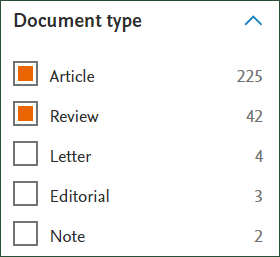
Most databases include options to refine the results after you enter a search. For example, if you want to find only journal articles, under Document Type(s), select Article and Review (or Review Article). This will find only primary research articles where the authors report on their own study, as well as literature reviews that report on the current state of knowledge on a specific topic.
Checking peer review status
Most journal articles found in library databases will be peer reviewed. Watch this 3-minute video for an explanation of the peer review process. But to make sure a journal has a peer-review process, you can try searching for the journal name (not the article title) in the database Ulrich’s Periodicals Directory and look for the little “refereed” symbol: 
Keep in mind that peer-reviewed journals can include content that is not peer reviewed, like editorials. Here are some clues that suggest a work is a scholarly research article:
- It has a label like “research article,” “original research,” “literature review,” etc.
- It is longer than a couple of pages
- It includes sections such as an introduction, methods, results, discussion, and conclusion
- It has references to other scholarly works