
Chapter 4: Statutory and Non-Statutory Deductions
4.4 Income Tax
4.4.1 Income Tax in Canada
Canada, like most countries in the world, taxes personal income. Income tax is a portion of an individual’s or business’s income that is paid to government to fund operations, programs, and services. The amount of tax paid varies by jurisdiction and, in most jurisdictions in Canada, varies by the amount of the taxpayer’s income. Typically, someone earning $200,000 per year will be in a higher tax bracket than someone earning $30,000 per year, meaning the higher income earner will pay a higher rate of tax (that is, a higher percentage of their income, not just a higher absolute amount).
Employers are responsible, under the Income Tax Act, for correctly determining and withholding the amount of each employee’s income tax payable to federal and provincial/territorial governments (except Québec, which administers its own provincial income tax system).
Province of Employment Rules
Employee tax rates are determined by the province of employment. Historically, this was defined as the province where the employee physically reported to work (for in-person work), or where the employer’s establishment was located (for remote work).
Effective January 1, 2024, the Canada Revenue Agency (CRA) updated the rules for remote workers(Government of Canada, 2025):
-
If the employee reports physically to work: The province of employment is the province where the employee physically reports for work.
-
If the employee never reports physically:
-
If a full-time remote work agreement exists, the employer must consider whether the employee can reasonably be considered “attached to an establishment of the employer.”
-
Indicators of attachment include:
-
The establishment where the employee would physically carry out their duties if not for the remote work agreement.
-
The establishment where the employee attends (or would attend) in-person meetings, even virtually.
-
The establishment from which the employee receives (or would receive) equipment, instructions, or supervision.
-
The establishment identified in the employee’s contractual agreements.
-
The establishment to which the employee would report, based on the nature of their duties.
-
-
-
If no remote work agreement exists and the employee cannot reasonably be attached to an establishment: The province of employment is the location of the employer’s establishment from which the employee’s salary is paid.
Determining Income Tax Withholding
Payroll calculates the amount of income tax to withhold from each employee for each pay period. If payroll software is used, the software will automatically calculate withholding amounts; however, payroll personnel must verify that tax rates are current and understand how the calculations are made.
To calculate income tax for a pay period, payroll must:
-
Determine the employee’s gross taxable income.
-
Subtract applicable deductions such as:
-
Union dues
-
Employee pension contributions
-
Amounts claimed on the employee’s TD1 forms (Personal Tax Credits Return) — both federal and provincial/territorial forms.
-
-
Apply the appropriate federal and provincial/territorial tax rates based on the employee’s province of employment.
-
Withhold the calculated income tax and remit to the Canada Revenue Agency (or Revenu Québec if applicable).
|
Step |
Instructions |
|---|---|
|
Step 1 |
Calculate the employee’s gross taxable earnings for the pay period. Gross Taxable Earnings = Gross Income + Taxable Benefits and Allowances for the pay period |
|
Step 2 |
Determine and add up the following deductions and credits for each employee: – Union dues – Employee pension contributions – Any amounts listed on the employee’s TD1 forms (federal and provincial/territorial Personal Tax Credits Return) |
|
Step 3 |
Annualize the amounts from Step 2 (convert them to an annual figure) and then divide by the number of pay periods in the year to calculate the per-pay-period tax credits. |
|
Step 4 |
Subtract the per-pay-period credits and deductions (Step 3) from the gross taxable earnings (Step 1) to determine the employee’s net taxable income for the pay period. |
|
Step 5 |
Apply the correct federal and provincial/territorial tax rates based on the employee’s province of employment to calculate the income tax to withhold. |
Payroll software or the CRA’s online payroll calculator can be used to determine withholding amounts, but payroll staff should always understand and verify the calculations.
4.4.1.1 Income Tax Calculation Using PDOC
The CRA online payroll calculator is abbreviated as “PDOC.” The calculator can be found here: Payroll Deductions Online Calculator
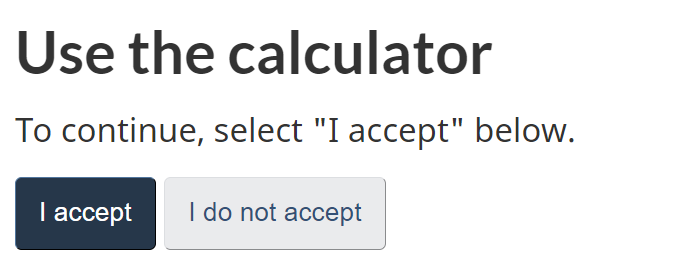
To begin, accept the terms of using the calculator:
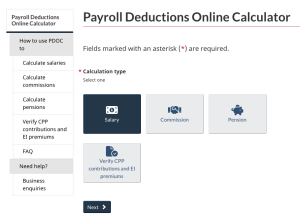
Next, select the type of calculation. The first option, Salary is what is commonly used.
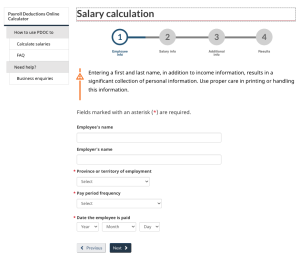
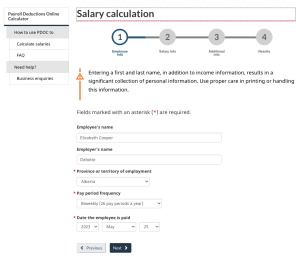
Next, enter the employee and employer information. It is important to select the appropriate province as this will impact the calculation of provincial income tax. The pay period frequency will be likely biweekly, semi-monthly, or monthly, but there are other choices as well. It is also important to note the date the employee is paid and ensure that the correct year is selected. The year selected will determine the rates for CPP, EI, and income tax; these rates typically change each year.
Income Tax Calculation Using PDOC Example
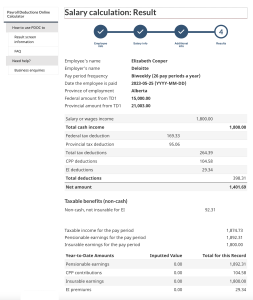
Elizabeth Cooper works for Deloitte in Edmonton, Alberta. She works full-time and is paid $1,800 biweekly. Elizabeth drove 416.67 Kms reimbursed at CRA reasonable rates of 72 cents (2025) for $ 300.00 that is deemed reasonable and non-taxable. Her employer also pays her life insurance premiums of $200 per month.
Elizabeth is not a unionized employee, and she does not participate in an employer pension plan.
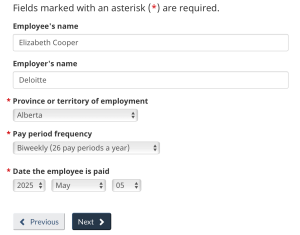
Identify whether there are any taxable benefits:
In the above example, Elizabeth’s life insurance premium is taxable. The vehicle allowance, which is a reasonable allowance as determined by the CRA, is not taxable.
For the taxable benefits, convert monthly amounts to biweekly amounts:
Life insurance: $200 per month × 12 months = $2,400 per year/26 pay periods = $92.31 per pay period
Enter this information in the online payroll calculator (Step 2) to determine her net pay.
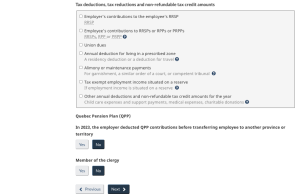
First, enter Elizabeth's salary, then select Taxable benefits and allowances. Enter the amount(s) of the taxable benefit(s) for the pay period. Cash benefits should be entered under Cash, insurable for EI. Recall that non-cash taxable benefits are generally not considered part of insurable earnings. The taxable benefit in the example (life insurance) should be entered as Non-cash, not insurable for EI.
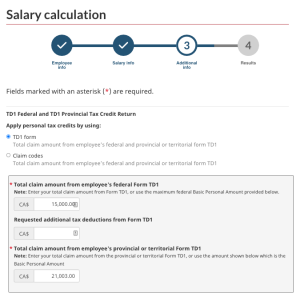
Next, enter the claim code for the employee. There are two options to select from: the first option is the amount from the TD1 form and the second option is the claim code number. If no information is provided, then select Claim Code 1 or allow the calculator to continue with the default, which is the first option. This would be the minimum claim code. For this example, select TD1 form.
Claim codes can be found here: Payroll Deductions Supplementary Tables: Claim codes
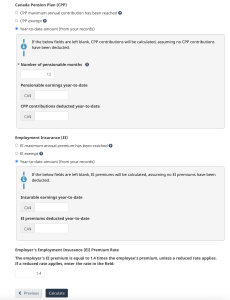
The last step is to click on Calculate to get the CPP, EI, and income tax deductions for the employee, as seen below:
4.4.1.2 Income Tax Calculation Using Payroll Deductions Table
Income tax can also be calculated manually by 1) determining net taxable earnings, then 2) applying the current year's payroll deductions table for the applicable jurisdiction. The payroll deductions tables for 2023 can be found here: T4032 Payroll Deductions Tables
References
Government of Canada. (2025). Determine the Province of Employment (POE). https://www.canada.ca/en/revenue-agency/services/tax/businesses/topics/payroll/set-up-new-employee/determine-province-employment.html
Government of Canada. (2024). Payroll deductions online calculator. https://www.canada.ca/en/revenue-agency/services/e-services/e-services-businesses/payroll-deductions-online-calculator.html
Government of Canada. (2023a). Payroll deductions supplementary tables – In Canada beyond the limit of any province/territory or outside Canada: Claim codes. https://www.canada.ca/en/revenue-agency/services/forms-publications/payroll/t4008-payroll-deductions-supplementary-tables/t4008oc-jan/t4008oc-january-general-information.html#_Toc334772403
Government of Canada. (2023b). Set up and manage employee payroll information: Determine the province of employment (POE). https://www.canada.ca/en/revenue-agency/services/tax/businesses/topics/payroll/set-up-new-employee/determine-province-employment.html
Government of Canada. (2023c). T4032. Payroll deductions tables. https://www.canada.ca/en/revenue-agency/services/forms-publications/payroll/t4032-payroll-deductions-tables.htmll
Image Credits (images are listed in order of appearance)
Government of Canada. (2023). Payroll deductions online calculator: Use the calculator [Screenshot]. https://www.canada.ca/en/revenue-agency/services/e-services/digital-services-businesses/payroll-deductions-online-calculator.html
Government of Canada. (2024). Payroll deductions online calculator: Calculation type [Screenshot]. https://apps.cra-arc.gc.ca/ebci/rhpd/beta/entry
Government of Canada. (2024). Payroll deductions online calculator: Salary calculation step 1 [Screenshot]. https://apps.cra-arc.gc.ca/ebci/rhpd/beta/step1
Government of Canada. (2024). Payroll deductions online calculator: Salary calculation step 1 with information entered [Screenshot]. https://apps.cra-arc.gc.ca/ebci/rhpd/beta/step1
Government of Canada. (2024). Payroll deductions online calculator: Salary calculation step 2 with information entered [Screenshot]. https://apps.cra-arc.gc.ca/ebci/rhpd/beta/step2
Government of Canada. (2024). Payroll deductions online calculator: Salary calculation step 3 with information entered [Screenshot]. https://apps.cra-arc.gc.ca/ebci/rhpd/beta/step3
Government of Canada. (2024). Payroll deductions online calculator: Salary calculation result [Screenshot]. https://apps.cra-arc.gc.ca/ebci/rhpd/beta/results